
How Often Should I Optimize My Campaigns?
- Uncategorized
- April 6, 2026
From budgets and bid strategies to keywords and copy, there’s a lot to keep track of when you’re running Google Ads campaigns. With so much vying for your attention, it’s easy to get overwhelmed.
One way to make sure you’re optimizing your campaigns for maximum results? Check in regularly to improve their performance.
Below, we share daily, weekly, and monthly tasks to keep your campaigns working their hardest. If you’re ready to take the guesswork out of Google Ads performance, then read on.
Want to see these tips in a quick, watchable format? Like and subscribe here:
Sections
Daily tasks for improving Google Ads performance
Daily check-ins can be short and sweet. Your main goal is to simply check in and make sure that your account is active, spending money, and tracking the conversions that you want it to.
With a quick daily check-in, you can:
- Analyze how well your campaigns are meeting your business goals
- Check your digital marketing KPIs
- Quickly fix any billing issues or ad or keyword disapprovals
Weekly tasks for improving Google Ads performance
Pick a day once a week where you can reliably set aside some time to review your Google Ads campaign performance. Here are three things we recommend checking:
- Your search term report. Make sure you’re not allocating any spend towards keywords that you don’t want to bid on. At the same time, if you see keywords that are converting really well, add those into your account and start bidding on them.
- Your budgets. Check your ad budget and make small adjustments as needed, depending on your campaign performance.
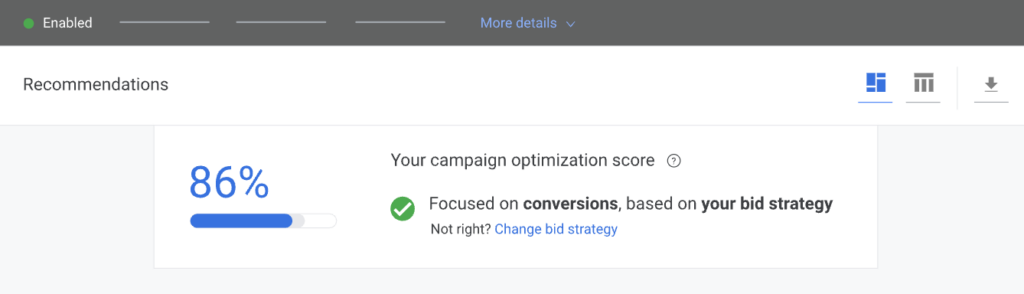
- Your optimization score. If you’ve ever chatted with a Google rep, you know that Google loves when you check your score and implement the recommendations. Think of it as free advice from Google for improving your campaigns. Optimization scores run from 0% to 100%. Your goal is to stay above 90% at all times.
Monthly tasks for improving Google Ads performance
Once a month, you can expect to spend a bit more time optimizing your Google Ads campaigns. Here are the three tasks we recommend:
- Review your creatives. Are they converting? If so, great. If not, swap out the underperformers for better creative.
- Check your audience lists. Keep those fresh by adding new customers every month. The more customer data you can give Google, the better Google can target similar customers and lookalike audiences.
- Check your Quality Score. Your Quality Score plays a major role in both where your ad appears in the search results and how much you pay per click. Ideally, yours should be between 8 to 10. Your first step is to fix any that are 5 and below. You can start by adding relevant keywords to your website or to your ad copy. (Read our blog for more tips on improving your Quality Score.)
Improving your Google Ads performance is a year-round task
Like most great marketing strategies, Google Ads are not set-it-and-forget-it — unless you’re okay with a less-than-stellar ROI. To truly optimize your campaigns, you need to be checking in regularly. Hopefully, that feels more doable now that you know how to break things down into daily, weekly, and monthly tasks.
For tailored advice on how to improve your campaigns, contact the Google Ads experts at Your Marketing People.






Recent Comments